
Auto Delivery of Shipping Documents
Shipping documents can be auto generated by the Spring Systems PortalApp and delivered to a third party application. This prevents the need for our partner applications to design the different label and packing slip formats required by each retailer. Shipping documents can include:
- GS1-128 labels
- Logo Packing Slip
- FedEx Labels
- UPS Labels
Usage Notes
METHOD - Shipping documents can be delivered by the PortalApp in three different ways:
- Delivered within the 940
- Returned as a response to a 945
- Returned as a response to an ad-hoc request
FORMAT - Shipping documents can be delivered by the PortalApp API response in two different formats:-
- Unique URL to hosted PDF file, Receiving system would use your API credentials and this unique string to build the URL.
- PDF file represented in Base64 text string. Receiving system would convert this text data back into a PDF file.
Delivered Within the 940
Internal PortalApp settings must be pre-configured for a 940 to include shipping documents. Additionally the items within the 940 must be pre-packed into the appropriate carton configuration. The following sample provides several scenarios of a 940 that includes shipping documents:
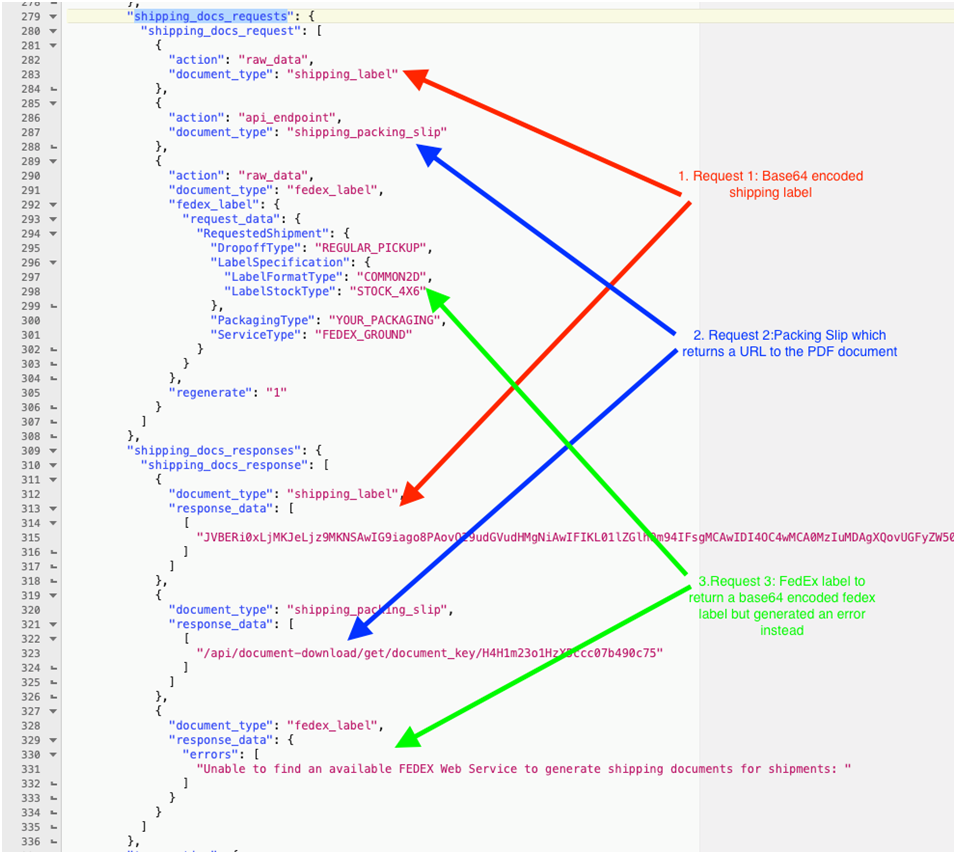
Returned As a Response to a 945 or an Ad-Hoc Request
When sending a 945 (Send Shipment to Spring) that needs to have shipping documents returned, or when using the standalone “Generate Shipping Documents from Spring” endpoint, specific requests and settings need to be provided.
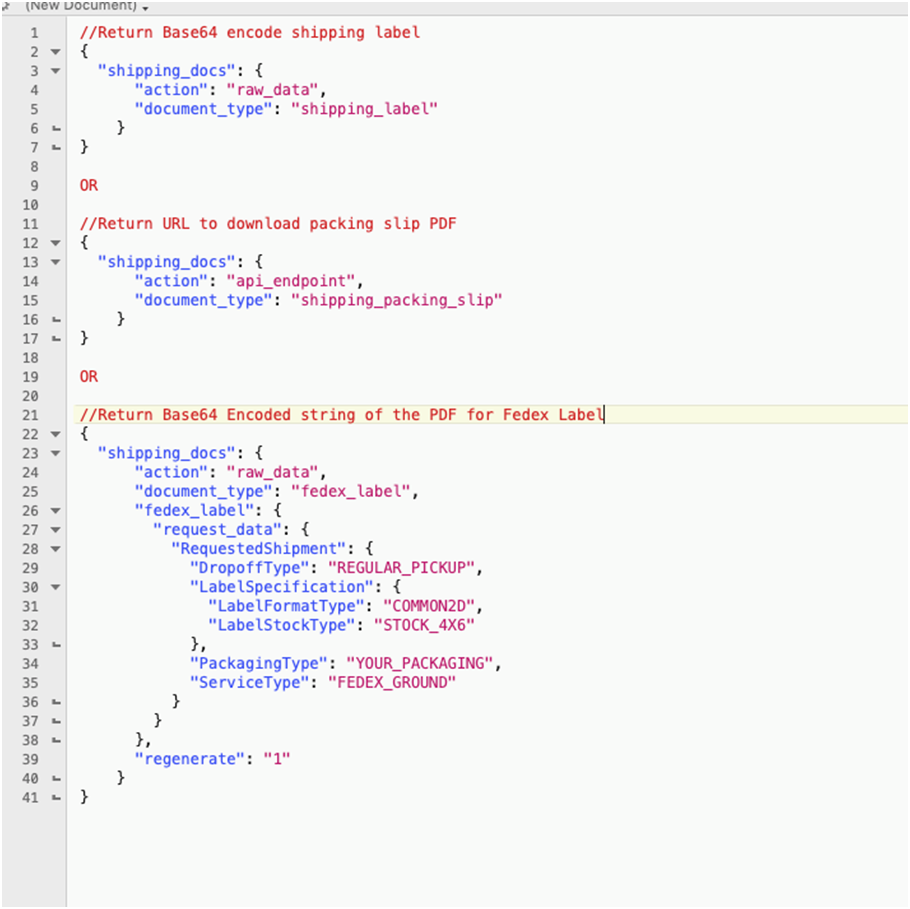
Examples - Returned As a Response to a 945 or an Ad-Hoc Request
In all examples below, ship_carton_number can be provided or PortalApp can provide this back to in the response. This number must be maintained for update or delete options.
Scenario 1 - Build shipment, WMS tells full packing info, send ASN now (yes, works now)
- Step 1 (e.g. first API call) - Create a shipment, WMS provides all packing, Trigger outgoing transaction = 1; Request Shipping Documents = yes. PortalApp replies with the labels and sends the ASN.
Scenario 2 - Build shipment, WMS tells full packing info, send ASN later
- Step 1 - Create a shipment, WMS provides all packing, Trigger outgoing transaction = 0; Request Shipping Documents = yes. PortalApp replies with the labels, shipment number, and does not send the ASN.
- Step 2 – Shipment update and send ASN for this specific shipment number (shipment number from step 1 must be provided), Trigger outgoing transaction = 1.
Scenario 3 - Build shipment, WMS tells each carton, send later
- Step 1 - Create a shipment, WMS provides packing of first carton (or not, maybe just create shipment), Trigger outgoing transaction = 0; Request Shipping Documents = yes; PA replies back with shipment number
- Step 2 - Shipment update. Update carton contents of an existing carton. Important, must give us back the shipment number that PortalApp provided in step 1.
- Step 3 - Shipment update. Add carton to this shipment. Important, must give us back the shipment number that PortalApp provided in step 1.
- Step 4 - Shipment update. Delete carton from existing shipment. Important, must give us back the shipment number that PortalApp provided in step 1.
- Step 5 - Shipment update. Add final tracking info and send ASN. Important, must give us back the shipment number that PortalApp provided in step 1.Trigger outgoing transaction = 1.
For each Shipment update step, the third party application does not need to provide carton detail. If carton detail is provided it will update those cartons. Carton numbers from step 1 must be provided. If carton detail is sent again but carton number are not included, new (and possibly duplicate) cartons will be created and added to your shipment and ASN.